L'écart de refonte d'agents IA : Pourquoi ton ROI plafonne à 15% au lieu de 280%
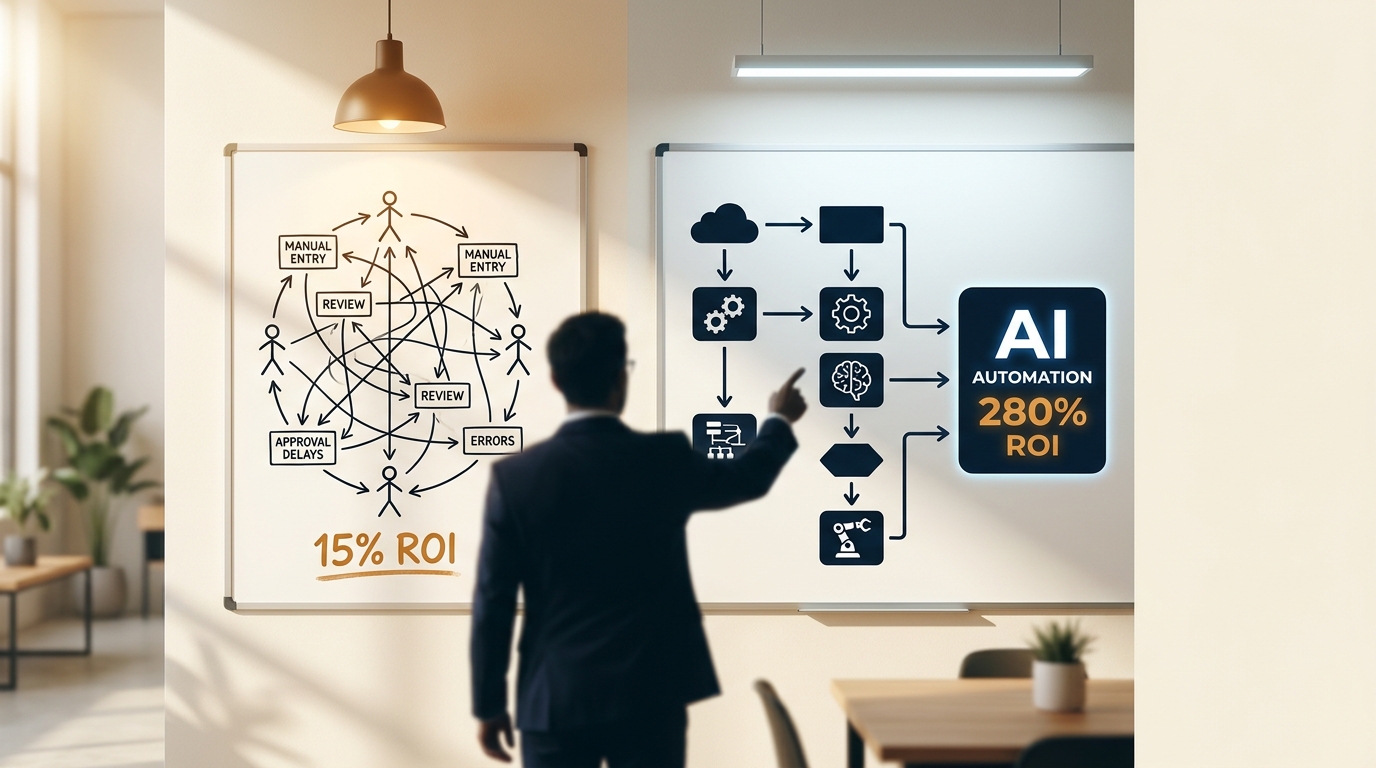
Le rapport AI Agent Trends 2026 de Google Cloud révèle une division claire : les organisations qui ont refondu leurs workflows autour d'agents IA ont obtenu un ROI significatif, tandis que celles qui ont automatisé les processus existants ont frappé des murs de frustration et de dépassements de coûts sans résultats. Ce n'est pas une question de sélection d'outils ou d'allocation budgétaire. C'est l'écart de refonte d'agents qui sépare 15% de ROI de 280% de retour.
La plupart des PME déploient des agents IA comme des mises à jour logicielles. Elles mappent les processus humains existants, ajoutent des couches d'automatisation, et s'attendent à une transformation. À la place, elles obtiennent une complexité coûteuse qui livre des améliorations à un chiffre pendant que leurs compétiteurs refondent leurs workflows de zéro et capturent des retours de niveau entreprise.
Le coût caché des workflows conçus pour les humains
L'analyse de PwC est directe : la technologie livre environ 20% de la valeur dans une initiative d'agents. Les autres 80% viennent de refondre le travail autour. Pourtant, la plupart des entreprises sautent complètement la phase de refonte.
Considère un workflow typique de service client conçu pour des humains :
- Le client envoie un courriel au support
- L'humain lit le courriel et catégorise le problème
- L'humain cherche dans la base de connaissances
- L'humain rédige une réponse
- L'humain envoie la réponse
- L'humain log l'interaction dans le CRM
- L'humain escalade les problèmes complexes au gestionnaire
Déploie un agent IA sur ce workflow, et tu obtiens des améliorations marginales. L'agent suit les transitions humaines, attend les approbations au rythme humain, et opère dans des contraintes conçues pour les limitations biologiques.
Refonds le même workflow pour une approche native aux agents :
- Le client envoie un courriel au support (l'IA traite instantanément)
- L'agent catégorise, cherche la connaissance, rédige la réponse, log l'entrée CRM, et identifie les critères d'escalade en parallèle
- L'agent envoie la réponse ou route vers un spécialiste humain basé sur les seuils de confiance
- L'agent monitore la satisfaction client et ajuste l'approche
La version refondue élimine quatre étapes séquentielles, retire les goulots d'étranglement humains, et opère à la vitesse machine. C'est d'où vient le 280% de ROI.
Les quatre patterns de refonte qui débloquent les retours d'entreprise
Pattern 1 : Du traitement séquentiel au parallèle
Les workflows humains sont séquentiels parce que les humains ne peuvent pas multitâcher efficacement. Les agents IA peuvent traiter plusieurs flux de données simultanément. The AI Automation Playbook montre des dizaines d'exemples où convertir des chaînes d'approbation séquentielles en validation parallèle débloque 40-60% d'économies de temps.
Une firme comptable québécoise a refondu la génération de soumissions d'une séquence humaine de 6 étapes à un processus parallèle de 2 étapes. Le temps de soumission est passé de 2 heures à 8 minutes. L'agent valide simultanément les données client, calcule les prix à travers plusieurs scénarios, génère la documentation de conformité, et prépare les templates de contrat pendant que l'humain révise les paramètres de haut niveau.
Pattern 2 : Des portes d'approbation aux seuils de confiance
Les workflows traditionnels utilisent des portes d'approbation humaines parce que les humains font des jugements subjectifs. Les agents IA utilisent des seuils de confiance parce qu'ils traitent des sorties probabilistes.
Au lieu de "l'humain approuve chaque facture de plus de 500{{CONTENT}}quot;, refonds vers "l'agent traite les factures avec 95%+ de confiance, route 90-95% de confiance vers révision spécialisée, signale sous-90% pour jugement humain". Cela élimine les goulots d'approbation tout en maintenant le contrôle qualité.
Pattern 3 : De l'intervention réactive à la prédictive
Les workflows humains réagissent aux problèmes après qu'ils surviennent. Les workflows natifs aux agents prédisent les problèmes et interviennent avant les points de défaillance.
Une entreprise de services a refondu sa gestion de projet des mises à jour de statut réactives au monitoring de risque prédictif. Au lieu de check-ins humains hebdomadaires, l'agent monitore la vélocité des projets, l'allocation de ressources, et les patterns de communication client. Il signale les retards potentiels 2-3 semaines à l'avance et suggère une réallocation de ressources avant que les échéances soient manquées.
Pattern 4 : Des rôles fixes à l'orchestration dynamique
Les organisations humaines utilisent des rôles de job fixes parce que les humains ont besoin de responsabilités claires. Les agents IA peuvent allouer dynamiquement les tâches basées sur la charge de travail, l'expertise, et la disponibilité.
Refonds "Sarah gère tout l'onboarding client" vers "l'agent orchestre l'onboarding à travers les spécialistes disponibles basé sur la complexité client, l'expertise du spécialiste, et la charge de travail actuelle". Cela élimine les goulots quand des personnes clés ne sont pas disponibles.
Pourquoi l'écart de refonte d'agents IA persiste
La recherche de Forrester montre que les agents boulonnés sur des workflows legacy au rythme humain produisent des économies de tâches, pas de valeur de changement d'étape. Pourtant, la plupart des entreprises résistent à la refonte de workflow pour des raisons prévisibles :
Complexité de gestion du changement : Refondre les workflows requiert retrainer le staff, mettre à jour les procédures, et changer les habitudes établies. C'est plus facile d'automatiser les processus existants que de les refondre.
Perception du risque : Les workflows humains se sentent plus sûrs parce qu'ils sont prouvés. Les workflows natifs aux agents se sentent risqués parce qu'ils sont nouveaux, même quand ils sont objectivement plus fiables.
Aveuglement d'implémentation : La plupart des entreprises ne peuvent pas visualiser à quoi ressemblent les workflows natifs aux agents. Elles connaissent intimement leurs processus actuels mais ont de la difficulté à imaginer des approches fondamentalement différentes.
Focus technologique : Les vendeurs vendent des outils, pas des transformations. Ils démontrent comment les agents IA peuvent automatiser les tâches existantes, pas comment refondre le travail autour des capacités d'agents.
Mesurer l'impact de l'écart de refonte
Le Stanford AI Index Report montre des agents IA atteignant 66% de taux de succès sur des tâches desktop, en hausse de 12% il y a un an. Mais ces benchmarks mesurent l'automatisation de tâches, pas la transformation de workflow. Les entreprises atteignant 280% de ROI n'automatisent pas juste les tâches plus avec succès. Elles éliminent des catégories entières de travail à travers la refonte.
Tu veux voir les chiffres pour ta propre entreprise ? Essaie le AI ROI Calculator gratuit pour estimer tes économies potentielles de refonte de workflow versus automatisation de tâches.
La plupart des entreprises lancent des initiatives IA sans définir de KPIs opérationnels liés à l'efficacité de workflow, réduction de coûts, ou vitesse de décision. Sans résultats mesurables, les investissements IA perdent le support exécutif avant que les bénéfices de refonte deviennent visibles.
Le framework de diagnostic pour identifier les opportunités de refonte
Red Flag 1 : Chaînes d'approbation linéaires
Si ton processus requiert des approbations séquentielles de plusieurs personnes, tu opères un workflow conçu pour les humains. Les processus natifs aux agents utilisent la validation parallèle et le routing basé sur la confiance.
Coût : Chaque étape d'approbation ajoute 2-4 heures de délai et crée des goulots quand les approbateurs ne sont pas disponibles.
Red Flag 2 : Entrée manuelle de données entre systèmes
Les humains ont besoin d'interfaces parce que nous traitons l'information visuellement. Les agents communiquent directement à travers des APIs. Si ton workflow inclut "entrer les données du Système A dans le Système B", tu roules un design humain-centrique.
Coût : Les erreurs d'entrée manuelle de données surviennent dans 1-3% des transactions et requièrent des cycles de correction coûteux.
Red Flag 3 : Temps de réponse fixes
Les workflows humains utilisent des horaires fixes : "Nous répondons à toutes les demandes dans les 24 heures". Les workflows d'agents utilisent la priorisation dynamique : "Les prospects haute-valeur obtiennent des réponses dans les 5 minutes, les demandes standard dans les 2 heures, les requêtes basse-priorité en fin de journée".
Coût : Les temps de réponse fixes soit sur-servent les interactions basse-valeur ou sous-servent les opportunités haute-valeur.
Red Flag 4 : Attribution de tâches basée sur les rôles
"Le marketing gère tout le contenu, les ventes gèrent toutes les démos, le support gère tous les tickets". Cela crée des goulots quand des personnes spécifiques sont surchargées. Les workflows natifs aux agents distribuent le travail basé sur la disponibilité, le match d'expertise, et l'équilibrage de charge.
Coût : Les goulots basés sur les rôles peuvent retarder les processus critiques de jours ou semaines.
Au-delà de la sélection d'outils : La question d'architecture
La plupart des discussions d'agents IA focalisent sur les comparaisons de plateformes et modèles de prix. La vraie question n'est pas quel outil utiliser, mais comment architecturer des workflows qui tirent parti des capacités d'agents.
The AI Business Toolkit inclut des frameworks pour refondre les workflows d'affaires communs autour de patterns natifs aux agents. Mais l'implémentation spécifique dépend de ton industrie, échelle, et exigences de complexité.
L'Operator d'OpenAI coûte 200$ mensuellement mais échoue 34% des tâches desktop selon les benchmarks OSWorld. Ce taux d'échec est acceptable pour l'automatisation de tâches mais catastrophique pour la refonte de workflow. Les workflows natifs aux agents construisent la redondance et la gestion d'erreurs dans le design du processus, pas juste la sélection d'outils.
Le reality check d'implémentation
Refondre les workflows autour d'agents IA n'est pas un projet de fin de semaine. Ça requiert mapper les processus actuels, identifier les opportunités de refonte, piloter de nouvelles approches, et itérer basé sur les résultats. La plupart des entreprises sous-estiment cette complexité et essaient de raccourcir directement au déploiement.
Si tu veux une longueur d'avance, le Starter Pack gratuit inclut 5 templates de workflow prêts-à-utiliser pour exactement ce type de transformation.
Les projets de refonte avec succès commencent avec un workflow haute-impact, prouvent que l'approche fonctionne, puis s'étendent à d'autres processus. Essayer de refondre tout simultanément crée le chaos sans livrer de résultats mesurables.
De 15% à 280% : La timeline de transformation
Les entreprises atteignant un ROI de niveau entreprise des agents IA suivent une progression prévisible :
Mois 1-2 : Mapper les workflows existants et identifier les candidats de refonte Mois 3-4 : Piloter un workflow refondu avec des métriques de succès Mois 5-6 : Itérer basé sur les résultats et étendre au second workflow Mois 7-12 : Scaler les patterns prouvés à travers des processus similaires
Les entreprises à 15% ROI automatisent les tâches existantes et s'arrêtent là. Les entreprises à 280% ROI utilisent l'automatisation de tâches comme preuve de concept pour la transformation de workflow.
La plupart des PME ont 3-5 workflows core qui pourraient bénéficier de refonte native aux agents. Focus sur le processus le plus haut-impact en premier, prouve que l'approche fonctionne, puis refonds systématiquement le reste.
Si tu vois des améliorations au niveau des tâches mais manques le potentiel de transformation, c'est exactement le type de défi que le service AI Blueprint adresse. Il mappe précisément comment refondre tes workflows spécifiques autour des capacités d'agents, pas juste automatiser les processus existants.
Articles connexes
Le cimetière des intégrations : pourquoi les consultants solo qui connectent leurs outils IA à QuickBooks finissent avec deux systèmes à gérer
Tu as connecté tes outils IA à QuickBooks et ton CRM. Maintenant t'as trois systèmes au lieu d'un. Voici pourquoi les intégrations d'outils IA échouent pour les travailleurs autonomes, souvent avant même que la première facture soit envoyée.
Le piège de la préparation à l'automatisation : pourquoi ton entreprise de services échoue avec l'IA avant même de commencer
La plupart des travailleurs autonomes blâment les outils quand l'automatisation ne fonctionne pas. Le vrai problème existait bien avant qu'ils achètent quoi que ce soit. Voici les trois conditions préalables qui déterminent si ton entreprise est vraiment prête.

Le mensonge du ROI en trois ans : pourquoi le 260 % de Pipefy ne s'applique pas à ta PME québécoise en six mois
Les études de cas d'entreprises promettent des retours de 260 %. Voici pourquoi ces chiffres sont structurellement impossibles à reproduire dans ta PME québécoise, surtout en six mois.
Pour aller plus loin
Tu veux aller plus loin?
Obtiens le guide complet avec 25+ systèmes, gabarits et cadres prêts à utiliser.
Explorer le guide →